SharePoint Discussion Column from BoostSolutions is a custom column to record users’ discussion when they edit the item. The SharePoint discussion thread can be listed in chronological order with discussion contents and discussants’ names.
With this SharePoint Discussion Column, you don’t have to choose “create version each time you edit an item in the list” when you select the “Append Changes to Existing Text” option of Rich text column:

Why Did We Build It?
SharePoint out-of-box Multiple lines of text column provides an option "Append Changes to Existing Text" to let users append their own comments and discussion without replacing others.
But it has two defects:
First, you must enable version creation when item edited, but it’s troublesome when you don’t want to create new version every time you append changes.
Second, every time you edit the item, a new record will be produced in the record history whether empty or not. It is inconvenient for users to view a lot of records with empty contents.
We develop SharePoint Discussion Column to solve these problems. When you append records to SharePoint discussion thread, with our SharePoint Discussion Column, new version will not appear and empty records will not display.


Enables you to send Event-Triggered Alert emails and Timer-Triggered Reminder emails which enhance and optimize your company’s workflow.
SharePoint Discussion Column provides a custom column that allows users to record their discussion in the item without creating new version or recording empty contents.
The following is a sample to use SharePoint Discussion Column. And here we configure all the settings based on SharePoint 2007 as example.
Members of SharePoint group named "Support Team" need to discuss current task in a list.
The members are as following:

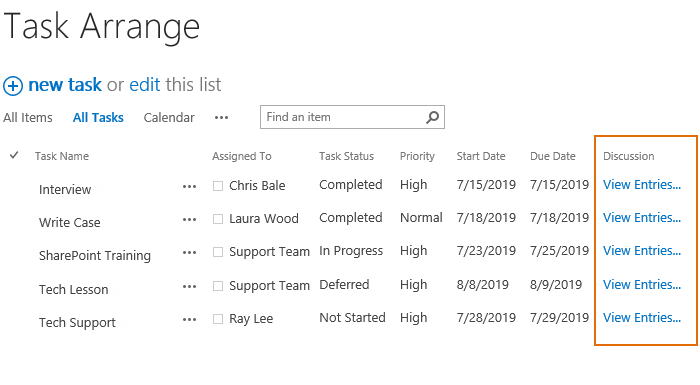
A list Task Arrangement is as following and each task is assigned to a member of the support team.

1. Create discussion column
On the Settings menu drop down list, click "Create Column”.

On the Create Column page, choose Discussion Column, and enter the name (such as Discussion), and then click OK.

Now the discussion column is created in the list as following.

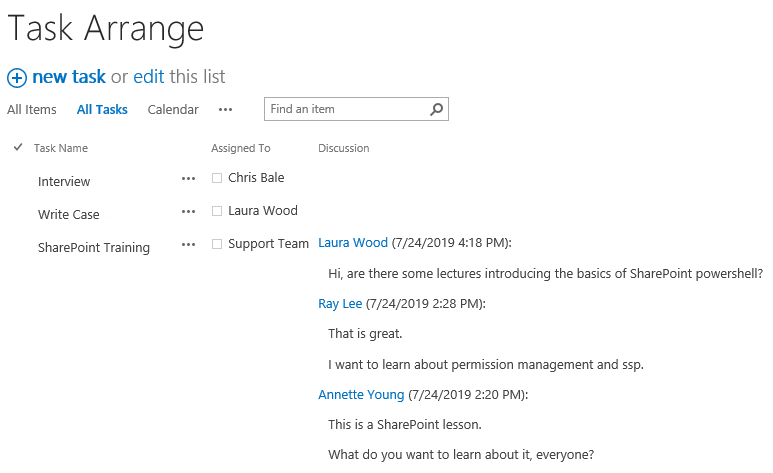
If you select the "Display discussion in all items page" Check box when create a discussion column, the discussion column will be displayed in all items page as following.


2. Discussion
Users can enter words in the item which they have permission.
Supposed that Henry has permission to edit the item, after he inputs his words into the discussion field and click OK, the content will be recorded in the discussion history.

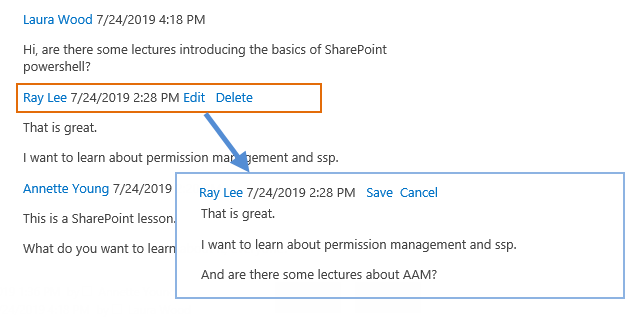
Others can view discussion history when he/she edit the item.


3. View discussion
User can view discussion history in item display form:

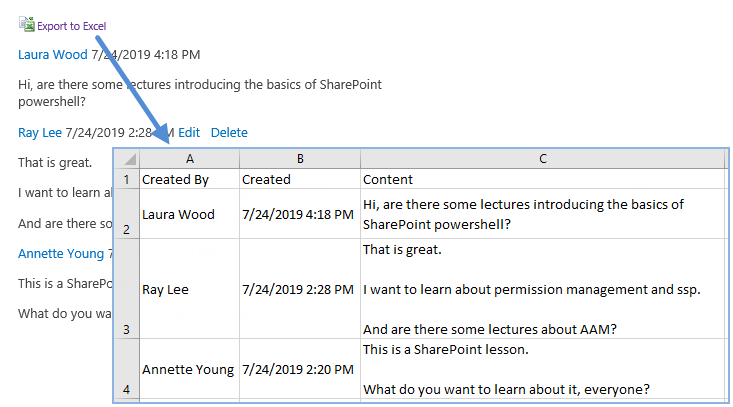
Now the discussion details show as following.

Top
Languages Supported: English, Chinese, Japanese
System Requirements
For SharePoint 2010:
| Operating System: |
Microsoft Windows Server 2008 x86/x64
Microsoft Windows Server 2008 R2 |
| Server: |
SharePoint Release:
- Microsoft SharePoint Foundation 2010 or Microsoft SharePoint Server 2010
- Microsoft .NET Framework 3.5
|
| Browser: |
Microsoft Internet Explorer 7 or greater is recommended for Advanced Administration features
Mozilla Firefox supported |
For SharePoint 2007:
| Operating System: |
Microsoft Windows Server 2003 x86/x64
Microsoft Windows Server 2008 x86/x64
Microsoft Windows Server 2008 R2 |
| Server: |
SharePoint Release:
- Microsoft Windows SharePoint Services v3 or Microsoft Office SharePoint Server 2007
- Microsoft .NET Framework 2.0 or 3.0
Note: This product is not compatible with SPS 2003 and WSS v2 |
| Browser: |
Microsoft Internet Explorer 6 or greater is recommended for Advanced Administration features |
Known Issues
- Does not support wiki list for SharePoint 2010.
Release Notes
|
1.8.507.0
May 10th, 2013
|
New Feature:
- Company brand updated.
|
| 1.7.818.0
Aug 18th, 2010
|
New Features:
- Server License is available;
- Announced compatibility with SharePoint 2010. |
| 1.6.107.0
Jan 13rd, 2010
|
Licensing module upgraded. |
| 1.5.820.0
Aug 21st, 2009
|
Licensing module upgraded. |
| 1.5.526.0
May 26th, 2009
|
Bug Fixed:
- Editing entry picture cannot be displayed in root web. |
| 1.4.429.0
Apr 29th, 2009
|
New Feature:
- Support Japanese. |
| 1.3.407.0
Apr 8th, 2009
|
New Feature:
- Display the discussion column in "all items" page.
Bug Fixed:
- Resolved the error: the discussion content becomes html code when users convert optional fields to required ones, or modify field description. |
| 1.3.316.0
Mar 17th, 2009
|
New Feature:
- Add "edit" button in discussion display item form.
Bugs Fixed:
- Support customized edit item form;
- Resolved the error: the content of the last discussion becomes html code after changing the column setting. |
| 1.2.1229.0
Dec 29th, 2008
|
Bug Fixed:
- Resolved the error: editor is changed when editing a document in doc library using desktop client. |
| 1.1.1204.0
Dec 5th, 2008
|
New Feature:
- Availability of farm license. |
| 1.0.1112.0
Nov 13rd, 2008
|
Initial Release |